

Hot App Reviews - Best Free Apps Download & Guides

Install Instagram at No-Cost

WhatsApp Setup

Download and Install YouTube

Keep your Instagram Private
 4.8
4.8
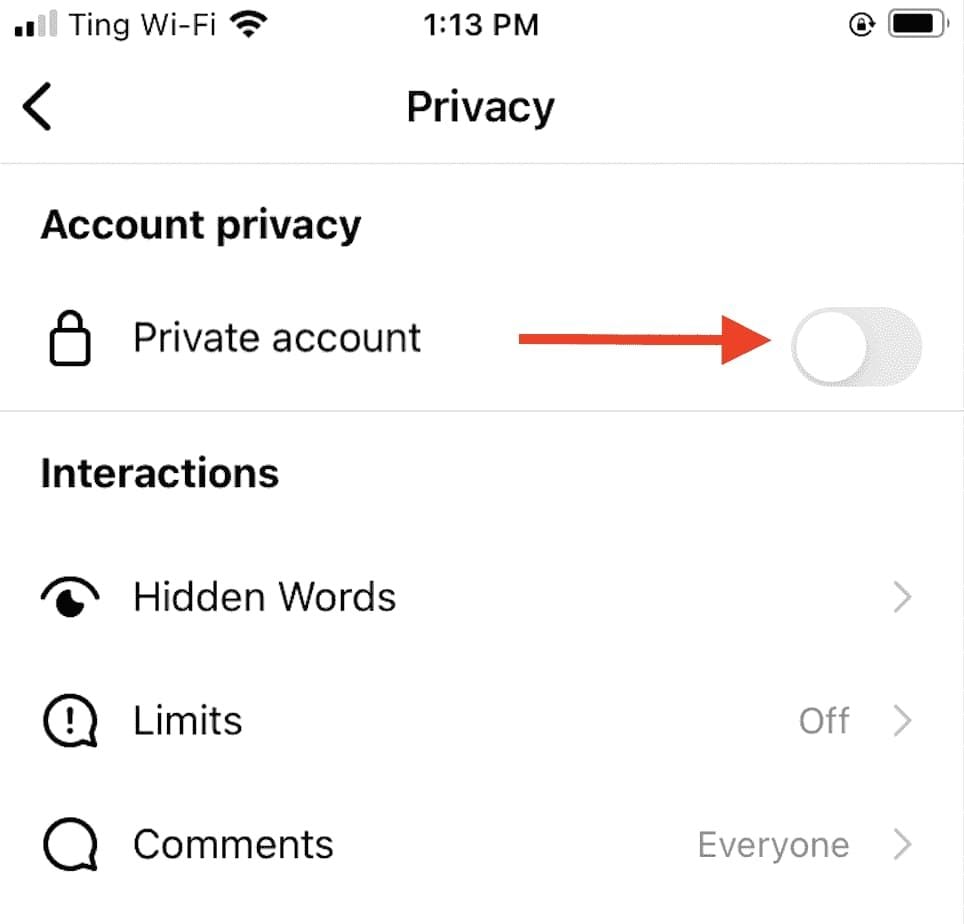
Privacy Settings1. Set your Account to Private:- Go to Settings > Privacy > Account Privacy and turn on “Private Account.” This will make your posts and stories visible only to approved followers.2. Manage Comments and Messages:- Control who can comment on your posts by going into Settings > Privacy > Comments where you can restrict comments from specific users or everyone except those you follow.3. Manage Location Sharing:- Be cautious when sharing location data while posting pictures or stories; disable location services in your device settings if necessary.4. Review Tagged Photos:- Check tagged photos by going into Settings > Privacy > Tags where you can choose whether tagged posts appear on your profile automatically or require approval first.5. Restrict Profile Visibility:- Regularly check followers; delete any that seem suspect or unauthorized to view your profile information.

Keep Your Account Secure
4.6
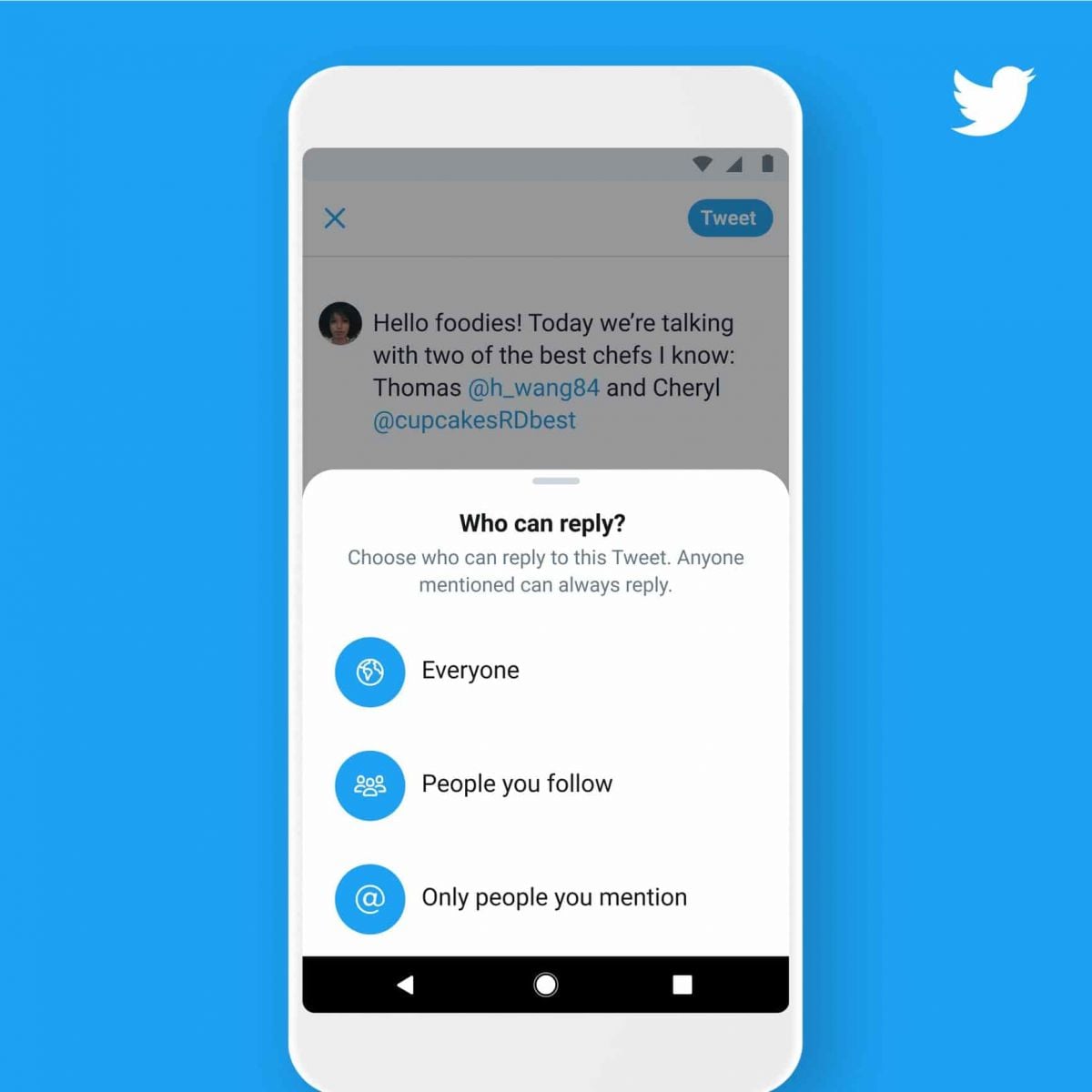
Measures to Prevent Compromise of Personal DataPrivacy Settings1. Set your account to private so that only confirmed followers can read your tweets.2. Control who can reply to your tweets by selecting options like “Everyone,” “People you follow,” or “Only people you mention.”Security Measures1. Enable 2FA for an extra layer of security during login.2. Use complex passwords like mix letters, numbers, and symbols and update them regularly.

Safe and Easy to Operate with the Facial Recognition System
4.0
Through adding facial biometrics within the app securely while setting up an account, users can take advantage of facial recognition. After setting up, the tech enables no-touch entry to parking areas and promotes self-guided payment confirmation and rapid vehicle return. It functions by detecting transmissions from the device's camera, processing the data captured and encrypted with a trained neural network to match against existing profiles for identification. Gone are physical passes or QR codes, meaning less waiting and better traffic flow at places like MSP's parking ramps.Privacy and data security are paramount features of the app that make it more beneficial. No facial data ever leaves the device itself. All facial information is cached and processed locally and is not transferred via any network - encrypted or otherwise. The feature also includes live notifications for parking session updates and low balances, keeping the control in the hands of our users while they park.This revolution is not only disruptively simple parking, but it also meets the changing needs of modern urban mobility, a frictionless answer for drivers who are in search of speed and safely.

Live Plant Help Get Quick Plant Answers
4.4
All you have to do is open the app, snap a clear photo of a plant's flower, leaf or stem and press send to identify. Fueled by a database of millions of new plant images, it provides results in seconds — much faster than the average wait time of one minute for many competitors. Despite its capacity for the identification of more than 20,000 fundamental types of flowering plants and ferns, speed has never been traded off against accuracy, which can be up to 88.2%.Whether you're out for a hike and spy a strange wildflower or you are dealing with an unknown garden cultivar, PlantNet's fast reply keeps your trajectory on track. No lag, no effort — just instant plant names and details at your fingertips, whether you're online or off; the perfect weekend tool for lightening your cognitive load on the go.

Simplifying International Money Transfers for Loved Ones Abroad
4.9
Fast, reliable and cheap money transfer speed and dependability are the brains of Remitly's services. While traditional banks often take days to process transfers, Remitly offers the possibility of near-instantaneous transactions in many cases. Among other things, users can pick between express transfers (it will arrive in minutes) and economy options (low fees, but it'll take 1-3 business days), depending their individual priorities.Transparency is another key advantage. Remitly removes unnecessary fees by showing exchange rates and charges up front, so that senders know exactly how much the receiver will get. This certainty instills confidence, particularly for a user remitting money to fund emergencies, education or household needs.The software also places a premium on being user-friendly. A user-friendly mobile app and website, allows senders to start a transfer with only a few taps on their smart phone, track the status for delivery of their transaction and save recipient information for easy access in subsequent transactions. Remitly has connections to many payment methods, bank accounts, debit cards, and cash pick up, so anyone's financial access needs can be accommodated.By combining great rates, fast speeds, and low fees, Remitly makes it easier to send money internationally for life's most important moments, so families can spend more time together.

Staying in Touch with Your Imprisoned Loved Ones
3.8
It's simple to use: sign up (or log in to an existing Securus account), locate your contact, buy “stamps,”and write a message. In addition to text, you can send up to 5 photos per message, e-cards and even a 30 second videogram (imagine, a smile on the faces of any loved one when they receive your video) You can also transfer stamps, or prepay for replies, to keep the conversation flowing.Ensure secure delivery of data, all communication is encrypted in transit and authorized contacts only are able to link up. You'll see the rejections notifications while you review your messages and attachments, stamps are not refunded. eMessaging helps friends and families connect easily and frequently with a great value that's safer, cheaper, and faster than snail mail.

Your Protection From Weather Surprise Now With No Ads
4.3
What we know for sure is that accuracy lives at its core: that it pulls original thunder-and lightning-making radar data straight from official systems, in combination with live lightning tracking and timely alerts from the National Weather Service and NOAA. This way users are always one step ahead of storms and can protect their homes and their families. The Mapbox-based interface is nice-looking and easy to use, too, skimming complex weather data without getting bogged down.And it comes 100% ad-free so that people can focus on safety without distraction all in one app. It encourages community safety by sharing radar view with the use of social media. Spanning areas including the USA, Canada and South Korea, with more to come, it's a trusty sidekick for casual planners and storm chasers alike.If you would like to emphasize certain features, such as storm tracking, regional coverage, etc, or have the tone catered for your audience (for example: outdoor enthusiasts), just say so.

Unleash Your Green Thumb with Blossom
4.3
One of Blossom's outstanding features is its Precision. Using advanced image recognition algorithms, it is so accurate that it can pick out plants down to species level, telling varieties apart as well. Whether you're in a dense forest or at home in your own back yard for example a quick snapshot will yield all sorts of detailed information about the plant's name, origin, care instructions and the like.In addition, Blossom doesn't stop at marking. It provides personal care tips for users, from watering schedules to optimum sunlight--to help them bring their plants up well.The app nourishes a spirit of togetherness by allowing users to exchange their discoveries and ask for advice from fellow plant lovers.In this way, Blossom is not merely a tool but also travel partner on your journey into plants. It makes plant care same to the perception with a touch of reality for everyone.Blossom is changing the way we connect with plants. Its intuitive design and powerful AI skills make it indispensable for anyone interested in the flora around them. With Blossom, learning and caring for plants has never been easieror more fun.

Discover Nature's Secrets with Plantum's Precision Plant ID
4
For botanists and fans of nature alike, it's easy to take a picture and have the relevant data on the potted plant that you like dumped right in your lap. Things like its botanical name and habitat, considerations for how to care after it and Potential area of application are all described by Plantum. These details together make an integrated picture to further enrich your appreciation and understanding of the broader world we live in.What elevates Plantum above the competition is its continuous pursuit of learning and improvement, a promise that its identification capability will keep pace with the leading edge in technological innovation. Never before has it been so precise and satisfying to explore and identify plants with Plantum.High-precision identification with Plantum. A For such advanced software, which uses artificial intelligence to identify plants, even a smart phone becomes a powerful botanical tool.Now you can capture images of plants and discover detailed information--including classification by species, habitat information, and notes on ecological significance, with unmatched precision. It is a particularly valuable resource for both home gardening and teaching, and an invaluable tool for those who love nature but do not have that love extended vegetablegrower.The precision of Plantum is unmatched in sophistication and ease of use alike, it must be counted as a uniquely accurate and informative guide for the future exploration of the manifold varieties and complexities that comprise plant life. Let's move ahead together, then, into this new world with Plantum.

2,000 Vintage Showa Songs Free in One App
4.3
From Frank Nagai's baritone on the one hand to the sugar-sweet vocals of Seiko Matsuda's early hits on the other—its library comprises 2,000 remastered tracks resurrected from original vinyl. Behind an interface that nostalgically mimics one of those humble cassette decks are VU meters bouncing in time with the beat—it naturally follows that smart playlists group songs by year, mood or even the subway lines current in the Showa era.Up to 500 favorites will be cached for enjoyment under ground or wherever signal strength is poor. As long as you turn on Lyric cards, they scroll through every word at the same speed as the song is playing: so you can sing "Blue Light Yokohama" and not miss a beat.Hit the "Today in Showa" panel, and what comes out?A decomposition of public sentiment. swing Hitting Showa dwellers over the head with a moment of intense nostalgia; the No. 1 hit which triggered off charts in days gone by.By downloading only this app now, you instantly receive, free forever, the radiant nightlife, transistor radios and heartfelt postwar melodies of Japan.