


Video Apps - Free Download & Official Reviews

Install Twitter Easily
 4.6
4.6
How to Get ItOn Mobile DevicesFor Android:1. Open Google Play Store on your device.2. Search for “X” in the search bar and click the official app from X Corp. More conveniently, you can just visit that page through here https://play.google.com/store/apps/details?id=com.twitter.android&hl=en_US.3. Click the “Install” button.4. After download, open the app and log in or create a new account.For iOS:1. Open the App Store on your iPhone or iPad.2. In the search tab, type “X”.3. Tap on the app from the results to download; tap “Get”. Alternatively, navigate it without the slightest effort from herehttps://apps.apple.com/us/app/x/id333903271.4. Once installed, open the application and log in or sign up.On ComputersFor Windows:1. Launch the Microsoft Store from your web browser or directly from the Start menu.2. Locate “X” and tap on the application.3. Click “Get” to download it.4. Once downloaded, find Twitter in your Start menu to open it.For Mac:1. Open the Mac App Store.2. To search Twitter, type ‘X’ in the search box. Or directly go to the same downloading page here https://apps.apple.com/us/app/x/id333903271.3. To download and install the app, tap Get.4. After you install it, open it from your Applications folder.Where Twitter Excels In1. Live Updates: Read the latest news on what’s happening in the news world.2. Engagement Tools: Like, Retweet and Reply to tweets.3. Multimedia Sharing: Share pictures, videos, and GIFs to make your tweets shine.4. Hashtags: To join the global conversations, use hashtags and search through content that is relatable to you.

How to Become Verified on Twitter
4.6
How to Increase Your Verification ChancesVerification Eligibility Criteria1. You need to pay for Twitter’s premium service, which is around $8 per month to get verified.2. Make sure your profile includes a display name, profile picture and bio that best represents you or your brand.3. Your account should be active with at least one tweet or retweet within the last 30 days.4. Your account must be at least 90 days old to apply for verification.5. Your profile information must not be deceptive or untrue; recent changes may affect qualifications.Steps to Apply for Verification1. Log in to your Twitter account. Click on Settings.2. Search for the verification request in account settings.3. Fill in the necessary information for your profile and submit the application.

Keep Your Account Secure
4.6
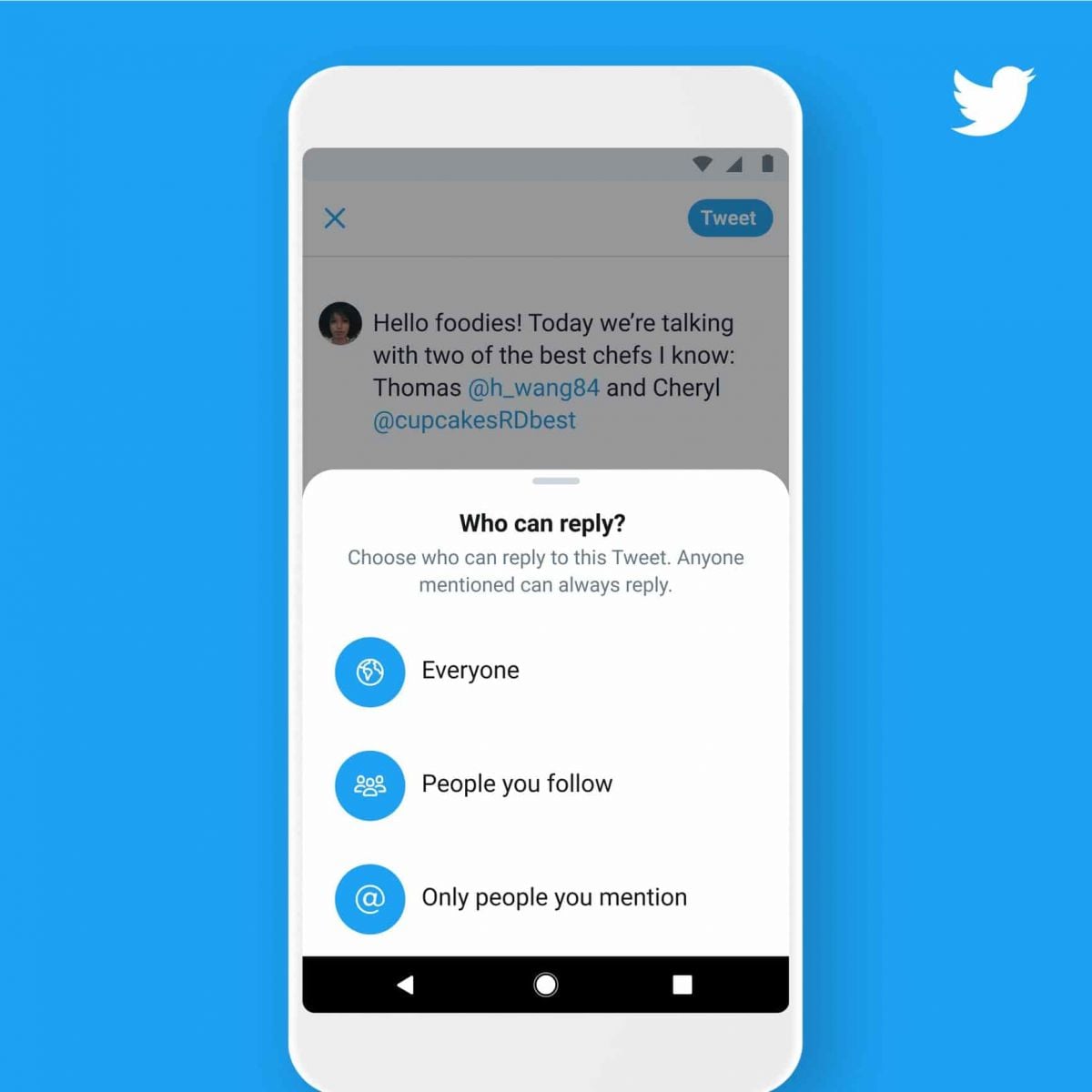
Measures to Prevent Compromise of Personal DataPrivacy Settings1. Set your account to private so that only confirmed followers can read your tweets.2. Control who can reply to your tweets by selecting options like “Everyone,” “People you follow,” or “Only people you mention.”Security Measures1. Enable 2FA for an extra layer of security during login.2. Use complex passwords like mix letters, numbers, and symbols and update them regularly.

Download Videos from Twitter
4.6
How to Save Videos You WantBuilt-in FeaturesThere’s currently no native way to download videos within Twitter’s website or app, however: You can bookmark tweets containing videos in it to watch online later.Third-Party Tools1. Websites such as SaveTweetVid or TwDown:- Copy the tweet link containing the video.- Paste it into the website’s input field.- Choose video quality and download.2. Use extensions such as Video DownloadHelper to get direct downloads from many sites, Twitter included.

Twitter Account Deactivation
4.6
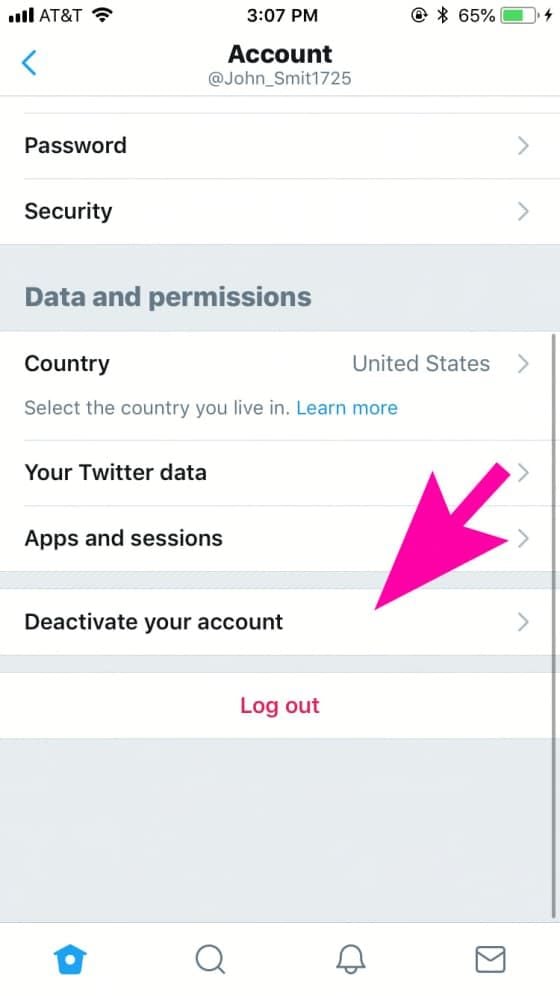
Steps to Disable Your Account1. Log in to your Twitter account via the desktop or mobile app.2. Click on your profile icon to go to “Settings”.3. Click “Your Account “then “Deactivate Your Account.”4. Go through the deactivation details shared by Twitter before finalizing your decision.Post-Deactivation TreatmentAfter deactivation, your account will be temporarily suspended for 30 days before it is permanently deleted; during this time you can reactivate if desired.

Get Your Small Screen on the Big Screen with Google Home
4.2
1.PreconditionsMake sure your phone and your TV are connected with the same WIFI.You need to download and install Google Home from App Store or Google PlayIf you’re using an android device, ensure your OS is 5.0 or higher and power conserving settings are off.2.Step-by-Step GuideTurn on Google Home, choose the device you want from the list, such as Chromecast or Android TV.3.Start CastingPress the button for “Cast my screen”or “Cast screen/audio”.Verify through “Cast screen”by choosing “Start now”when it appears.Adjust settings. Control volume from the "Media" tab in the app. Try moving closer to a strong Wi-Fi signal or close any background apps that might be affecting performance, in case of lag.4.Stop CastingPull down the notification panel and disconnect or open Google Home to Stop mirroring.5.Pro TipsCasting from a Chrome browser on computers is also supported, visit chrome.com to download the Google Chrome browser.If you have a non-stock Android device (Samsung in particular), the Google Home app tends to work best.Just say "Netflix" and Google Home will be ready to start your streaming. Whenever you want to stream videos, share a presentation or review photos, Quicklink makes it easy.

How the Showai Makes 2,000 Classic Songs Easy to Enjoy
4.3
Its interface is clear and very intuitive. The start screen often presents big, easy-to-locate buttons for popular songs, random picks or such curated playlists. You can pull up songs by artist or even delve into comprehensive searches for a title. Finding a song you love is almost too easy. Tapping any piece immediately begins playing it, with a simple player that provides play, pause and forward control buttons.Better yet, the app uses mood and theme as common facilitators so that discovering new oldies is just as easy. No matter if you are a life-long enthusiast or new to the territory, this app puts at your fingertips 2,000 schedules of nostalgia, completely free and seamless musical journey back in time.

What You Can Do with WhatsApp
4.6
How to Use WhatsApp to Its Full Potential1. Users can send text messages, voice notes, make voice calls, and conduct video calls. It provides one-on-one chat and supports group chats of about 256 participants-a just-right number for team communication or family gathering.2. WhatsApp allows sending photos, videos, GIFs, and documents easily. Users can send high-quality media without the fear of compression or loss of quality. WhatsApp also supports sending live locations to help in coordinating meetups.3. The Status feature allows users to post photos and videos that vanish in 24 hours. It offers the possibility of sharing moments without their being saved-the feature is very tempting for users.

Encountering Zero Hidden Fees
4.9
Remitly shows you all fees upfront from the very beginning, once you commence a transfer. Choose where you want to send it on the pricing page, and you'll immediately see associated fees, competitive exchange rates and the amount the recipient will receive exactly. There are no hidden charges and confusing calculations, whether sending to Nigeria at 0% fees or paying suppliers in Japan. Even third-party fees from banks or wallets are revealed up front, meaning that you do not waste time without being duly informed.And for peace of mind, Remitly comes with a promise to deliver on time—or it will refund your fees if there's a delay. With 100+ supported currencies and millions of international users, Remitly is evidence that transparency and dependability can cooperate.