Traffic Apps - Free Download & Official Reviews

Traffic
Qu'est-ce que Waze et pourquoi l'utiliser?

Qu'est-ce que Waze et pourquoi l'utiliser?

4.6

Trafic en temps réel :Waze analyse les conditions de circulation grâce aux données partagées par ses utilisateurs.Alertes communautaires :Recevez des signalements sur les accidents, radars, travaux ou tout autre obstacle.Gain de temps :Waze recalculera instantanément votre itinéraire pour éviter les bouchons et vous faire gagner du temps.Personnalisation :Vous pouvez ajuster vos préférences de navigation, choisir des itinéraires spécifiques ou personnaliser la voix de guidage.

Qu'est-ce que Waze et pourquoi l'utiliser?
Comment télécharger et installer Waze?

Comment télécharger et installer Waze?

4.6

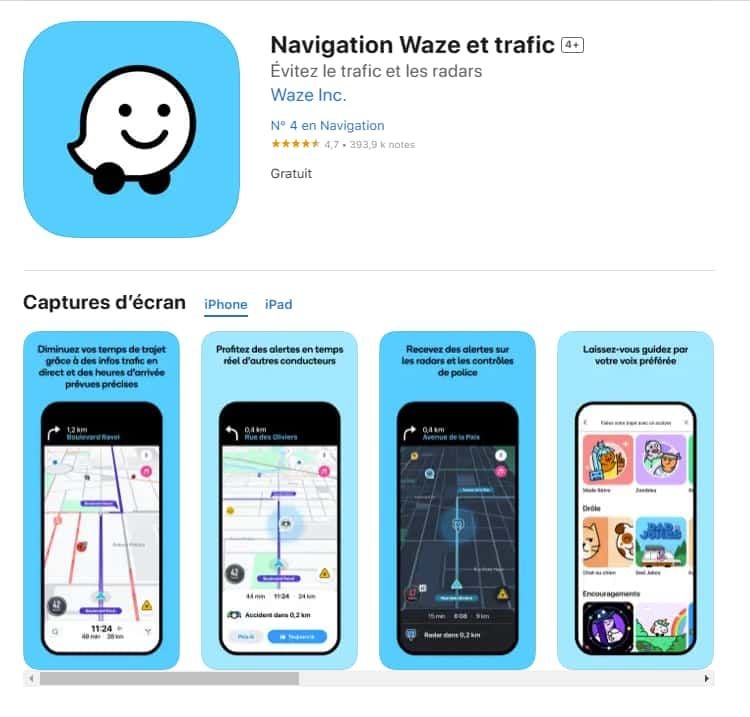
Pour les utilisateurs iOS :1.Accédez à l’App Store.2.Tapez « Waze – GPS et Trafic » dans la barre de recherche.3.Cliquez sur Obtenir pour lancer l'installation. Ou vous pouvez cliquer directement sur le lien: https://apps.apple.com/fr/app/navigation-waze-et-trafic/id3232291064.Une fois l’installation terminée, ouvrez Waze et configurez votre compte.
Comment télécharger et installer Waze?
Comment mettre à jour l'application Waze?

Comment mettre à jour l'application Waze?

4.6

Sur Android :Ouvrez le Google Play Store.Accédez à « Mes applications et jeux ».Cherchez Waze dans la liste des applications installées.Cliquez sur Mettre à jour, si une mise à jour est disponible.

Comment mettre à jour l'application Waze?
Comment utiliser Waze pour la navigation et le trafic?

Comment utiliser Waze pour la navigation et le trafic?

4.6

Waze est simple et intuitif. Voici un guide pour débuter :Lancer l'application : Ouvrez Waze sur votre smartphone.Entrer votre destination : Tapez l’adresse dans la barre de recherche.Choisir un i

Comment utiliser Waze pour la navigation et le trafic?
Comment créer et gérer un compte Waze?

Comment créer et gérer un compte Waze?

4.6

Créer un compte :Ouvrez l'application Waze.Cliquez sur « Se connecter » ou « Créer un compte ».Entrez votre adresse e-mail, un mot de passe et d'autres informations nécessaires.Validez votre compte via un e-mail de confirmation.
Comment créer et gérer un compte Waze?
More Related Blogs
Variety of Vehicles to Choose from

Variety of Vehicles to Choose from

4.8

1.UberX: The Affordable Everyday ChoiceUberX is ideal for cheap and quick rides, UberX includes regular 4-seater vehicles. Perfect for commuting and short runs, this one brings comfort to a budget.2.UberXL: Space for GroupsTraveling with friends or family? UberXL offers SUVs and vans for up to 6 people. Good for airport runs, group outings or toting extra luggage.3.Uber Comfort: More Legroom, Less ConversationChoose a vehicle with more legroom, newer interior and drivers that don't mind an optional quiet ride. Great for your long rides or anyone that wants a little extra room.4.Uber Black/Black SUV: A Touch of ClassUber Black and Black SUV provide luxury vehicles with professional drivers for special occasions or business trips. Indulge in luxury interiors, white gloves service and a hint of glamour.5.Uber Green: Eco-Friendly TravelFor an eco-friendly option, ride with Uber Green in hybrid or electric vehicles to decrease your carbon footprint while getting around.

Variety of Vehicles to Choose from
Main Features of Google Home

Main Features of Google Home

4.2

1.Centralized Smart Home ControlGoogle Home is a control center for your smart home appliances — lights, thermostats, security cameras and door locks that are compatible with the Nest platform. Users can pair the smart plugs with relatively simple voice commands like “OK, Google, turn on the living room lamp” to bring convenience and simplicity to an everyday task. On the software front, it plays nicely with other products, such as Philips Hue and Nest, and forms one integrated system.2.Voice-Activated ConvenienceGet answers from Google and control your home using your voice with the built-in Google assistant. It can remind you of your calendar, report the weather, play music from Spotify or YouTube Music and even control — turn on and off — TVs with Chromecast built into them. The Voice Match capability identifies you when it talks to you and then can provide responses based on your calendar, turn on reminders or remember things like what networked speakers you prefer.3.Automation and RoutinesGoogle Home makes your everyday easier by delivering the simplicity of voice control to hundreds of compatible smart devices. For instance, a "Good Morning" program can switch on lights, read news headlines and raise the temperature. These personalizable automations also save time and improve productivity, ensuring that the device becomes a natural extension of users' lives.4.Entertainment and ConnectivityMore than just a means to run smart-home technology, Google Home is also an entertainment star that can play music and podcasts, in addition to YouTube videos. It is hands-free enabled for calls and texts, while Google Calendar, Maps and other services help users stay organized. And with ongoing updates and support for the Matter smart home standard, Google Home is still a forward-looking addition to any modern household.

Main Features of Google Home
Beginner-Friendly Sports Betting on Stake.com

Beginner-Friendly Sports Betting on Stake.com

5

Soccer (Football): Football is the world game with a widely popular betting variation that is easy to comprehend, such as winner of match, over/under goals, and both teams to score. Having so much information available makes it easier for newcomers to place smart bets.Tennis: Betting on tennis is simple with common markets like match winner, set winner, and games in play. Tennis matches are typically brief, and beginners can quickly understand results and outcomes.Basketball: Similar to tennis, basketball offers simple bet types like moneyline and point spreads. The fast pace and high scoring frequency make it exciting and easier to comprehend for new bettors.Esports: Stake.com also has esports betting, which is growing very rapidly. Leagues like League of Legends, CS:GO and Dota 2 have simple betting markets and are popular among young players who know the game.Quick Tips for All Beginners- Start with single‑leg bets before attempting parlays.- Bet small to maintain control of risk and become comfortable with the platform.- Utilize Stake.com’s live odds feed to spot value opportunities.- Utilize the “My Bets” page to monitor outcomes and adjust your strategy.

Beginner-Friendly Sports Betting on Stake.com
How Does Ghost Detector Actually Work

How Does Ghost Detector Actually Work

4.2

Technically, Ghost Detector Real Life Radar employs device sensors such as camera, infrared sensor, microphone, light, and even magnetometer to scan for anomalies within the environment. The radar mode translates fluctuations within these sensors into on-screen movement or sound waves. Unusual readings or static changes may appear as moving red dots, which can be viewed in the radar mode of the app. The camera is set to detect sudden movement or shadows, and the EVP recorder is idle awaiting unexplainable noises—tuning in and filtering out faint noises to “pick up” “ghost voices.” It even has night vision capability to enable users to “see” spirits in dark places.Nevertheless, it must be said that the app is programmed to be entertainment. Different disclaimers indicate that the findings are not scientifically verifiable. Physical or electromagnetic movement in the device environment—Wi-Fi signals, radios, metallic devices, or light changes—can be detected as “paranormal” activity. Hence, as good as the app might be at simulating ghost hunting, there is no method it can have to differentiate between actual paranormal activity and simple environmental movement. Most professional critics and developers point out that there is no scientific foundation for smartphone apps to actually detect ghosts. So users ought to read in an open and enjoyable manner, recalling that any evidence must be regarded as speculative.

How Does Ghost Detector Actually Work